Building a Production-Grade Multi-Tenant SSO Platform from Scratch
May 202610 min read
Building a Production-Grade Multi-Tenant SSO Platform from Scratch
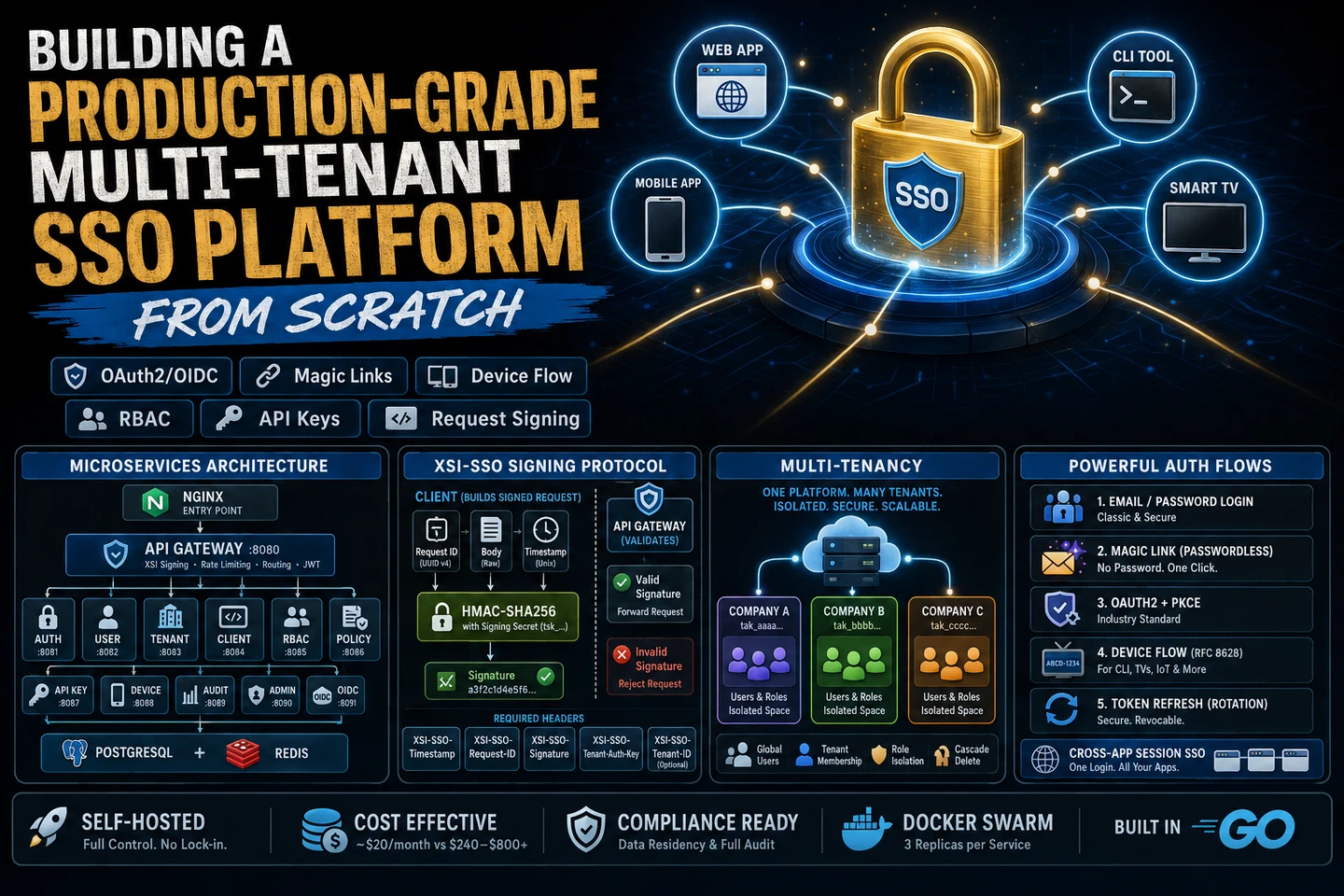
Auth0 costs $240/month at 1,000 MAU. Okta costs more. And both lock you into their ecosystem. So we built our own — a fully self-hosted, multi-tenant SSO platform with OAuth2/OIDC, magic links, device flow, RBAC, API keys, and request signing. In Go. Deployed on Docker Swarm with 3 replicas per service.
This is the complete technical breakdown.
Why Build Your Own SSO?
Before diving into implementation, the honest question: should you?
Auth0 / Okta
Self-Hosted SSO
Cost at 10K MAU
$240–$800/month
Server cost (~$20/month)
Setup time
Hours
Weeks
Compliance (data residency)
Depends on plan
Full control
Custom auth flows
Limited
Unlimited
Vendor lock-in
High
None
Maintenance burden
None
On you
If you're building a B2B SaaS product, need data residency compliance, or want full control over auth flows — self-hosted makes sense. If you're a solo developer shipping fast, just use Auth0.
We're building a B2B platform where tenants need isolated identity namespaces, custom branding, and compliance with data residency requirements. Self-hosted was the only real option.
Architecture
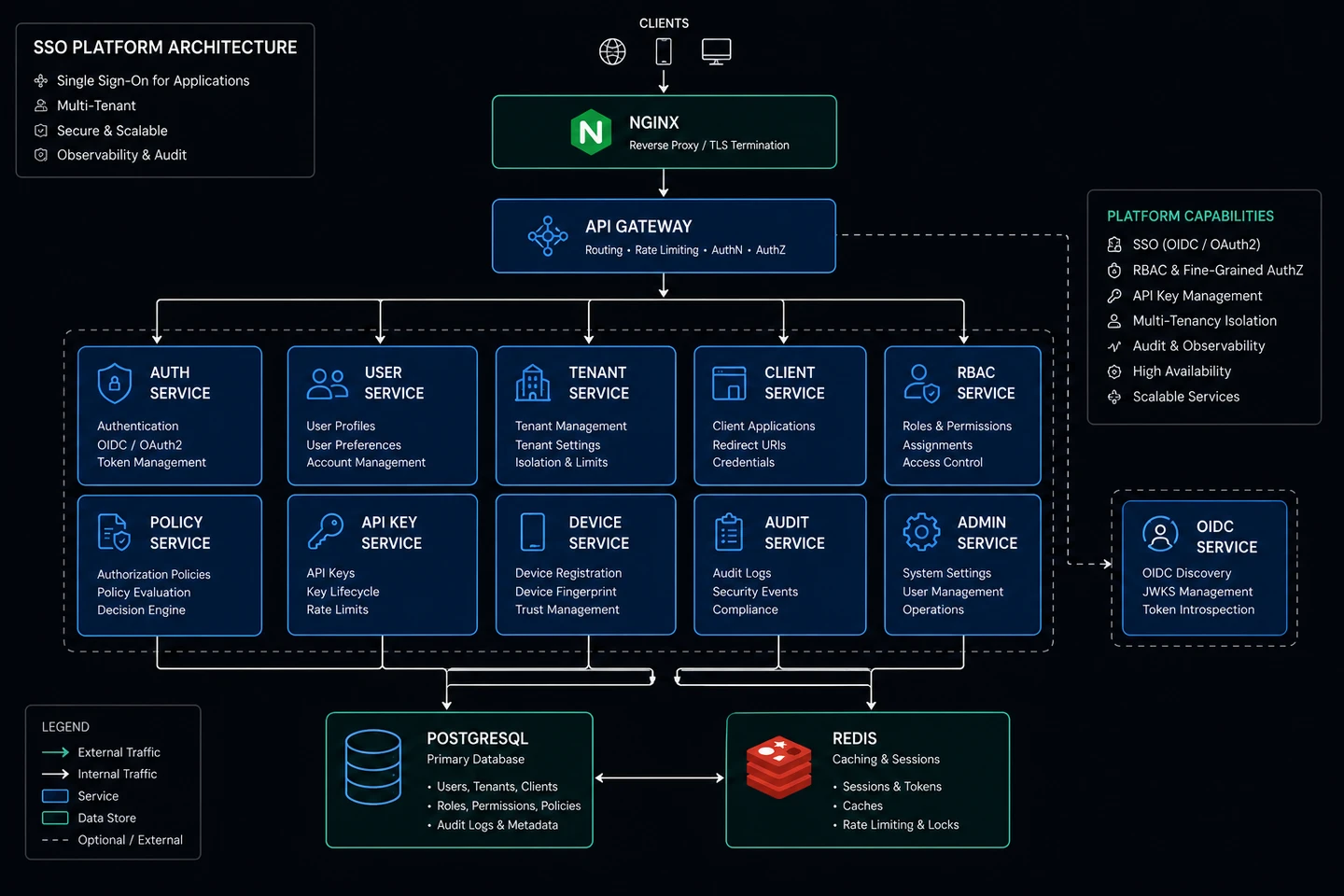
The platform is built as a microservices architecture — 12 Go services behind a central API Gateway, communicating over internal Docker networks.
Why Microservices?
Each service owns a specific domain and can be scaled, deployed, and updated independently. Auth and OIDC typically see the highest traffic — they can be scaled to 5+ replicas without touching the others.
More importantly: all services are stateless. Every piece of mutable state lives in Postgres (persistent) or Redis (ephemeral/session). This is what makes horizontal scaling safe — any replica can handle any request.
The 12 Services
1. Gateway Service (:8080)
The front door. Every external request passes through here.
Responsibilities:
XSI-SSO signature validation — rejects unsigned or tampered requests
Rate limiting — Redis sliding window, standard X-RateLimit-* response headers
Request routing — proxies to the correct upstream service
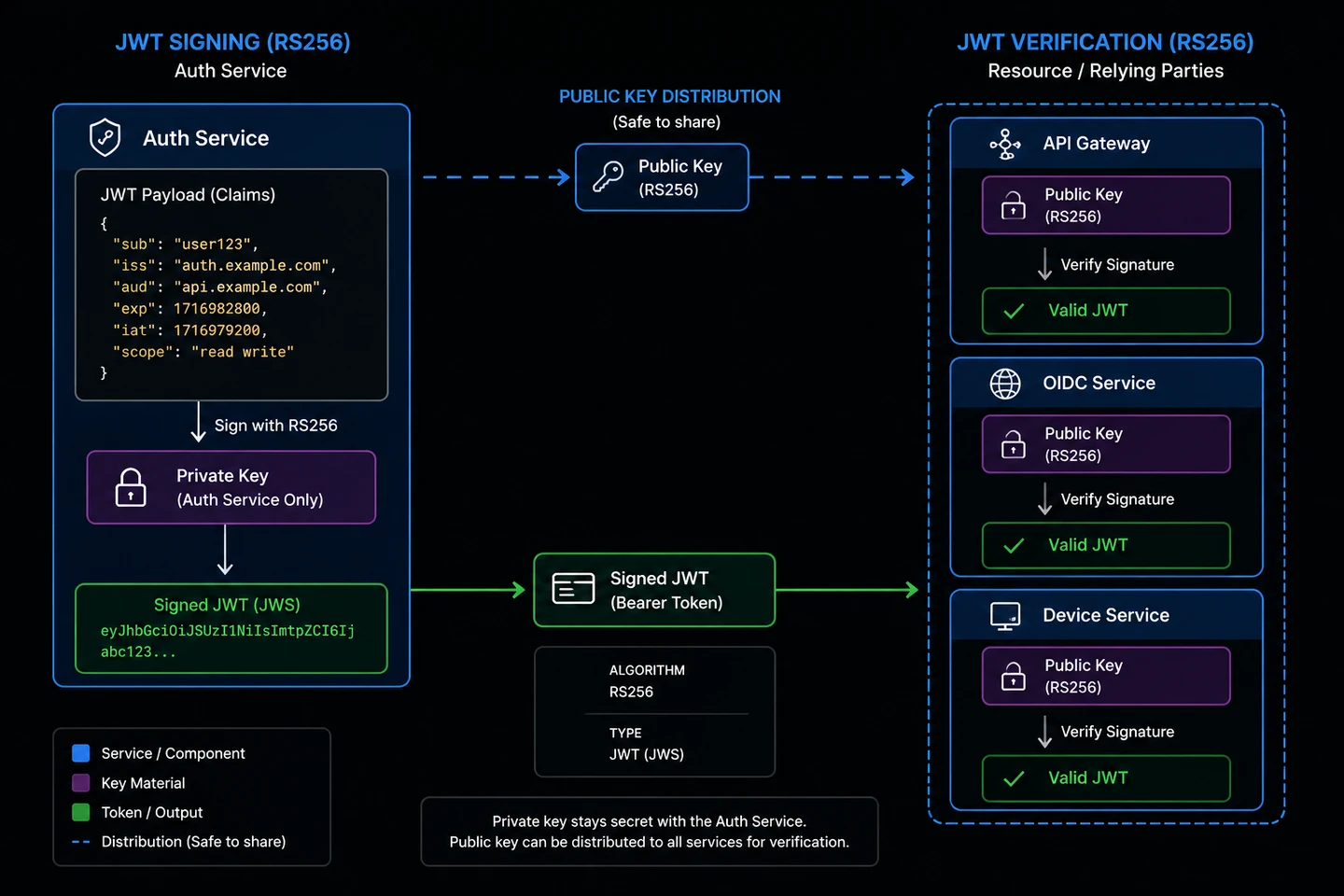
JWT validation — verifies Bearer tokens on protected routes
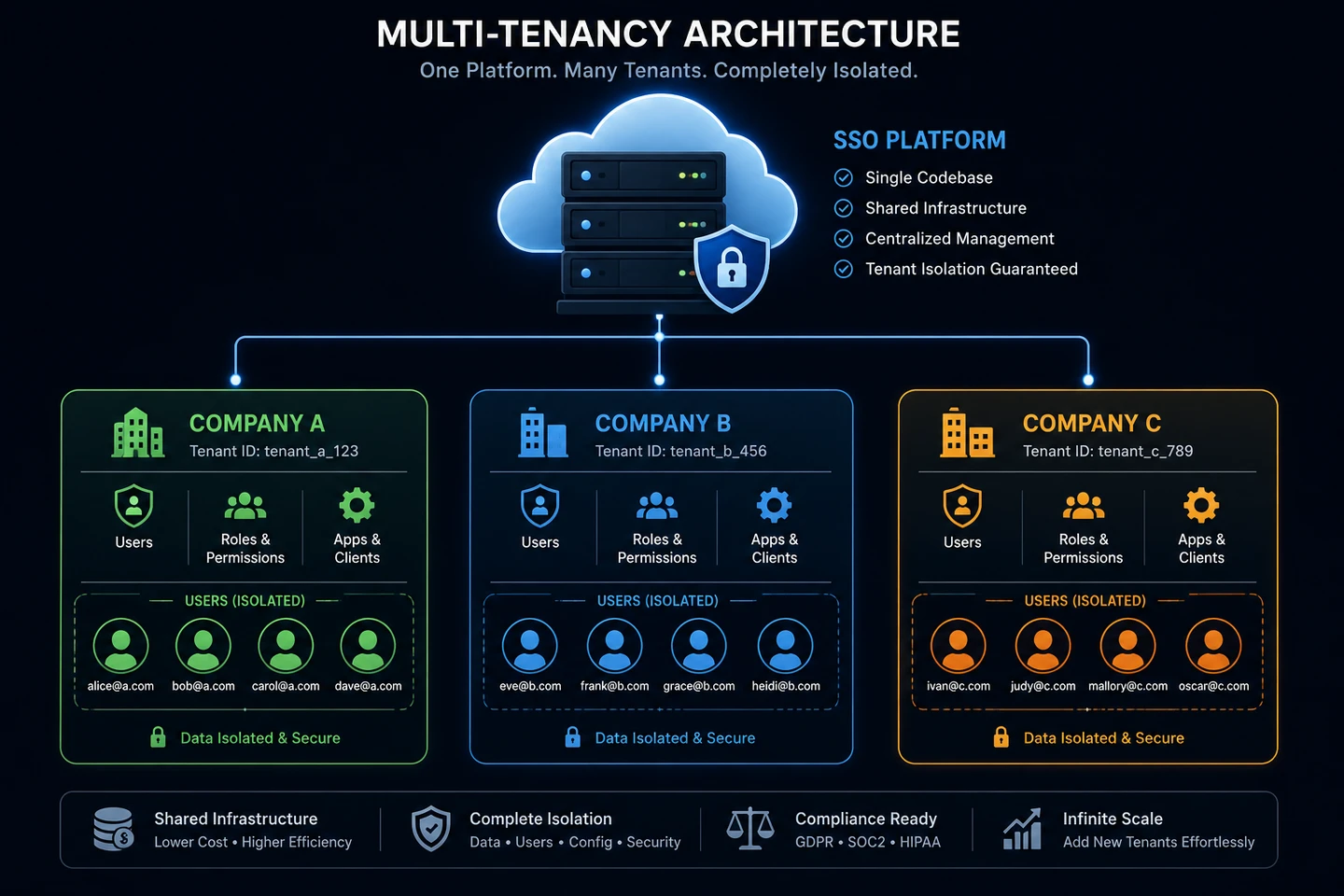
Users are global — they exist independently of tenants. A user joins a tenant via tenant_members. This means one account can belong to multiple organizations, like GitHub.
4. Tenant Service (:8083)
Multi-tenancy management.
Each tenant is an isolated identity namespace with its own:
Slug and domain (e.g., acme.sso.example.com)
Auth key (tak_ prefix) and signing secret (tsk_ prefix)
Allowed login roles
Member roster
5. Client Service (:8084)
OAuth2 client management.
Tenants register OAuth2 clients (web apps, mobile apps, CLIs) with:
Redirect URIs
Allowed grant types (authorization_code, refresh_token, device_code)
Scopes
Client secret (SHA-256 hashed, never stored in plaintext)
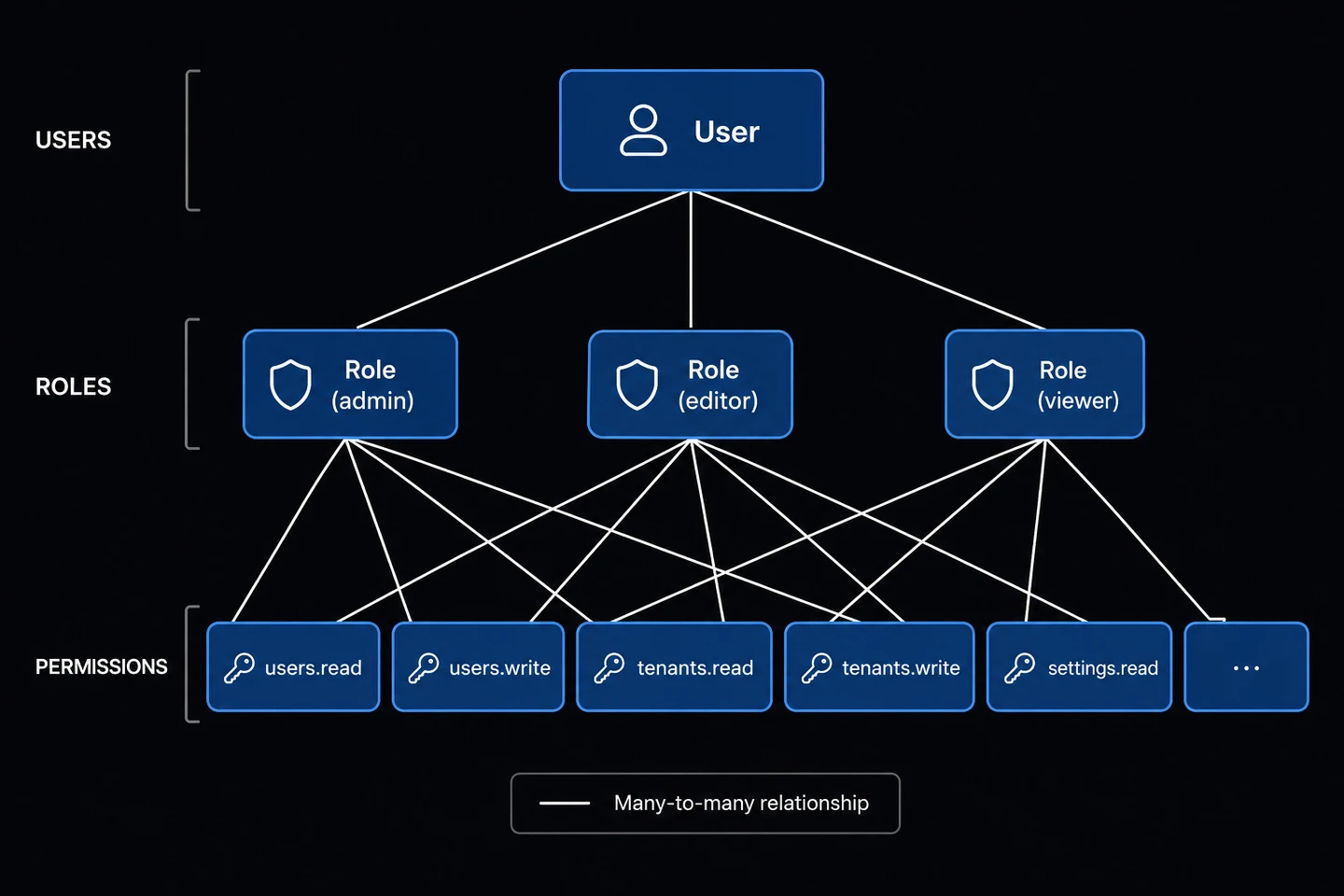
6. RBAC Service (:8085)
Role-based access control.
Tenant-scoped roles
Global permission definitions
Role-permission assignments
User-role assignments per tenant
7. Policy Service (:8086)
Privacy policy versioning and user consent.
Policy CRUD with version history
Automatic deactivation of old versions on publish
Per-user consent tracking
Consent history
8. API Key Service (:8087)
Server-to-server authentication.
sk_ prefixed keys, SHA-256 hashed in DB
Scope-limited access
Expiry support
Verification endpoint for backend services
9. Device Service (:8088)
Device authorization flow (RFC 8628).
For CLI tools, Smart TVs, and any device without a browser. User approves from their phone/computer while the device polls for approval.
10. Audit Service (:8089)
Audit trail and login history.
Login/logout events per tenant
IP address and user agent tracking
Queryable audit log for compliance
11. Admin Service (:8090)
Dashboard API for platform operators.
Platform-wide stats (users, tenants, active sessions)
Force-terminate sessions
Manage devices, API keys, policies
Full audit log access
12. OIDC Service (:8091)
OpenID Connect provider (RFC 6749 + OIDC Core).
Full OIDC-compliant provider with discovery document, PKCE, token introspection, and revocation.
The XSI-SSO Signing Protocol
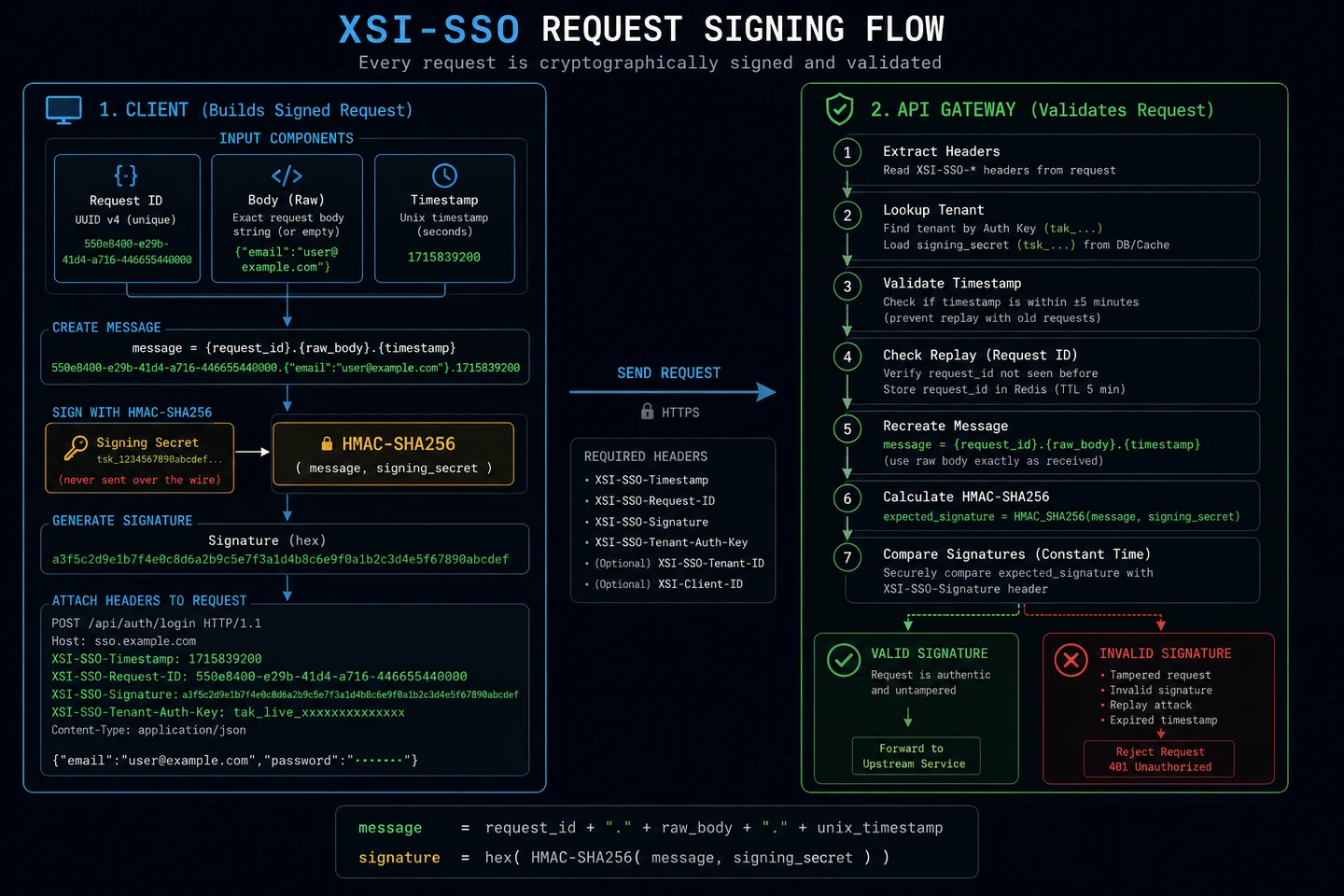
This is the most unique part of the platform. Every API request must be cryptographically signed before the Gateway will forward it upstream.
Why Request Signing?
Standard JWT auth protects who makes a request, but not what they're sending. A man-in-the-middle could capture a valid JWT and replay a different request with it.
XSI-SSO signs the request body + metadata with a tenant secret that never travels over the wire. This provides:
Request integrity — body cannot be tampered in transit
Replay protection — each request ID is single-use (5-min TTL in Redis)
Timestamp validation — requests older than ±5 minutes are rejected
Some paths bypass signing — email verification links, password reset, and all OIDC routes (which follow their own RFC-defined auth):
GET  /api/auth/verify-email
GET  /api/auth/magic-link/verify
POST /api/auth/forgot-password
POST /api/auth/reset-password
POST /api/api-keys/verify
     /authorize, /token, /userinfo, /jwks.json, /.well-known/*
Multi-Tenancy
Global Users, Tenant Members
The most important design decision: users are global, not per-tenant.
-- Users exist independently of tenantsCREATE TABLE users ( id UUID PRIMARY KEY, email TEXT UNIQUE NOT NULL, name TEXT, password TEXT, -- argon2id hash created_at TIMESTAMPTZ);-- Users join tenants via this tableCREATE TABLE tenant_members ( id UUID PRIMARY KEY, tenant_id UUID REFERENCES tenants(id) ON DELETE CASCADE, user_id UUID REFERENCES users(id) ON DELETE CASCADE, roles TEXT[], joined_at TIMESTAMPTZ, UNIQUE(tenant_id, user_id));
This means:
One email/password works across multiple organizations (like GitHub)
Deleting a tenant doesn't delete the user — only the membership
Roles are scoped per tenant (user can be admin in Tenant A, viewer in Tenant B)
Tenant Isolation
Each tenant has:
auth_key (tak_ prefix) — public identifier sent in request headers
signing_secret (tsk_ prefix) — private key for HMAC signing, never returned in API responses
allowed_login_roles — restrict which roles can log in via which clients
Cascade delete — removing a tenant cleans up all its members, clients, roles, and API keys
Tenant Lookup Flow
When a signed request arrives at the Gateway:
Extract XSI-SSO-Tenant-Auth-Key from header
Look up tenant by auth key (Redis cache → Postgres fallback)
The SSO session cookie (sso_session) is also set on the configured COOKIE_DOMAIN — enabling cross-app SSO for all subdomains.
2. Magic Link (Passwordless)
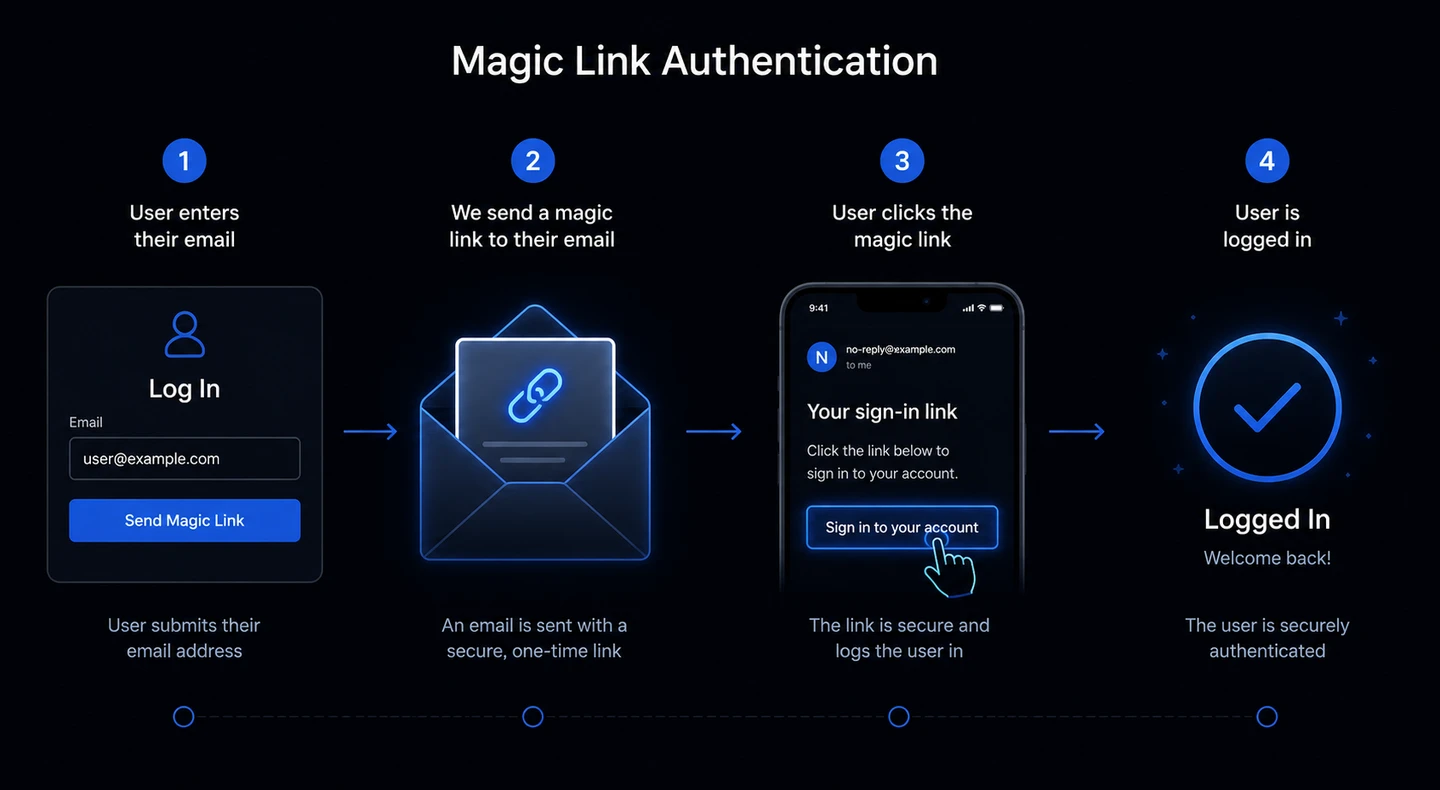
No password needed. User gets a one-time login link via email.
POST /api/auth/magic-link
{ "tenant_id": "...", "email": "[email protected]" }

→ Email sent with: https://sso.example.com/api/auth/magic-link/verify?token=...

GET /api/auth/magic-link/verify?token=...&tenant_id=...
→ Returns access_token + refresh_token (or redirects if redirect_uri was set)
Token is one-time use — consumed on first click
Expires in 15 minutes
Stored hashed in Redis
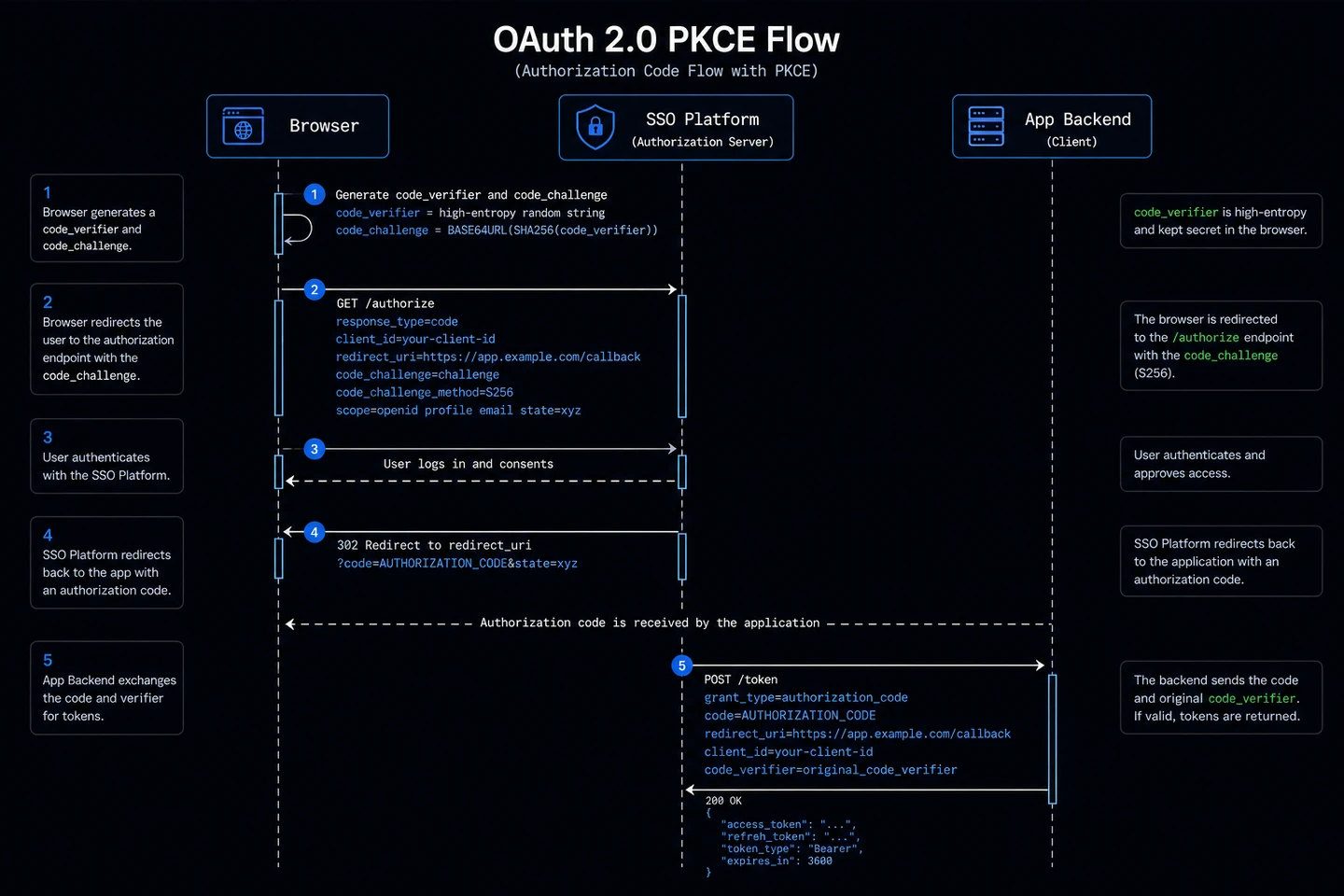
3. OAuth2 Authorization Code + PKCE
The standard OIDC flow for web and mobile apps. PKCE (Proof Key for Code Exchange) prevents authorization code interception attacks — mandatory for public clients (SPAs, mobile).
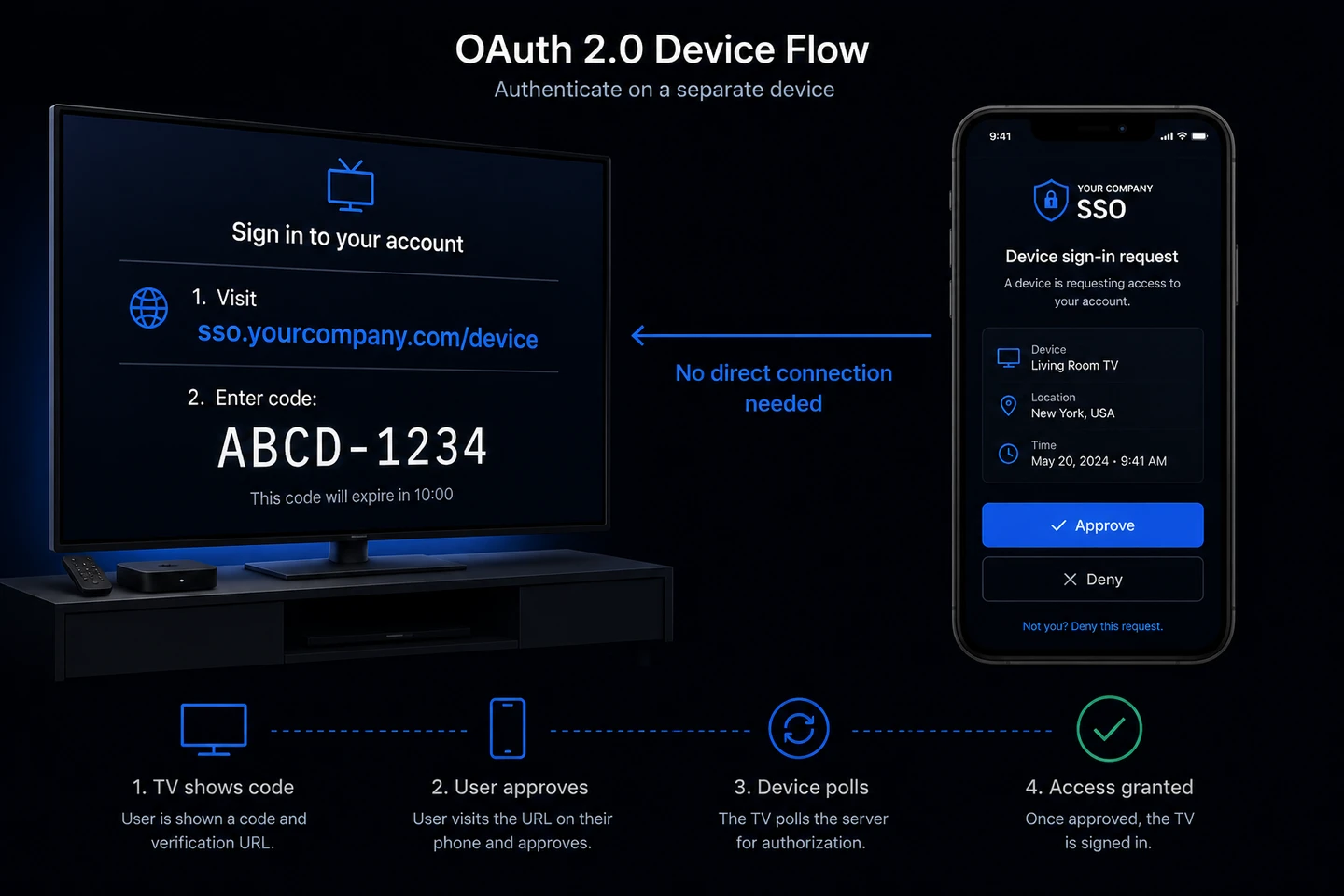
For CLI tools, Smart TVs, game consoles — any device without a convenient browser.
An illustration of the device flow authentication: a TV screen on the left showing "Visit sso.example.com/device — Enter code: ABCD-1234". A smartphone on the right showing the SSO approval screen with an "Approve" button. An arrow connecting them labeled "No direct connection needed". Dark background, modern flat design.
This is how GitHub CLI, Google TV, and Xbox do authentication. The device gets a short code, the user approves on their phone, and the device gets tokens.
// 1. Device requests code
POST /device/code
{ "tenant_id": "...", "client_id": "..." }

→ {
    "device_code":        "long_opaque_code",
    "user_code":          "ABCD-1234",
    "verification_uri":   "https://sso.example.com/device",
    "expires_in":         900,
    "interval":           5
  }

// 2. Show user_code to user:
//    "Visit https://sso.example.com/device and enter: ABCD-1234"

// 3. User approves on their browser (already logged in)
POST /device/authorize
Authorization: Bearer USER_ACCESS_TOKEN
{ "user_code": "ABCD-1234", "approve": true }

// 4. Device polls every 5 seconds
GET /device/status?device_code=long_opaque_code
→ { "status": "authorization_pending" }  // not yet
→ { "status": "approved" }               // ready!
→ { "status": "denied" }                 // user rejected

// 5. Device exchanges code for tokens
POST /device/token
{ "device_code": "long_opaque_code", "client_id": "..." }
→ { "access_token": "...", "refresh_token": "...", "device_id": "..." }
5. Token Refresh with Rotation
POST /api/auth/refresh
{ "refresh_token": "current_refresh_token" }

→ {
    "access_token":  "new_jwt",
    "refresh_token": "new_refresh_token"  // old one is revoked
  }
Token rotation means each refresh invalidates the old token and issues a new one. If a refresh token is stolen and used, the legitimate user's next refresh will fail — alerting them to a breach.
Session Lifetimes
Token
TTL
Behavior
Access Token (JWT)
15 minutes
Short-lived, stateless
Refresh Token
7 days sliding
Resets on each use
SSO Session Cookie
7 days sliding
Mirrors refresh token
Magic Link
15 minutes
One-time use
Absolute Session Max
90 days
Hard limit from first login
6. Cross-App Session SSO
Once logged in, users don't re-authenticate on other apps sharing the same COOKIE_DOMAIN.
App A:
  User visits → /authorize → Logs in → sso_session cookie set on .example.com
  → Redirected back with tokens ✓

App B (same domain, same tenant):
  User visits → /authorize → Cookie detected → Auth code auto-issued
  → Redirected back with tokens ✓ (no login form shown)
Set COOKIE_DOMAIN=.example.com and all apps on *.example.com share the session.
// 1. Create a role
POST /api/rbac/roles
{ "tenant_id": "...", "name": "editor", "description": "Can manage content" }

// 2. List available permissions
GET /api/rbac/permissions

// 3. Assign permissions to role
POST /api/rbac/roles/{role_id}/permissions
{ "permission_ids": ["uuid-of-users.read", "uuid-of-users.write"] }

// 4. Assign role to user
POST /api/rbac/users/{user_id}/roles
{ "role_ids": ["uuid-of-editor-role"] }
Roles and permissions are embedded in the JWT claims — no database lookup needed on each request:
The platform is a full OpenID Connect Provider, RFC 6749 compliant.
GET  /.well-known/openid-configuration   // Discovery document
GET  /authorize                          // Authorization endpoint
POST /authorize                          // Authorization (form post)
POST /token                              // Token endpoint
GET  /userinfo                           // UserInfo endpoint (Bearer required)
GET  /jwks.json                          // JSON Web Key Set
POST /introspect                         // Token introspection (RFC 7662)
POST /revoke                             // Token revocation (RFC 7009)
This means any OIDC-compatible library can integrate with the platform out of the box — NextAuth.js, Passport.js, Spring Security, etc.
Security Deep Dive
Password Hashing
Argon2id — the winner of the 2015 Password Hashing Competition. Memory-hard, resists GPU/ASIC attacks.
Replay Attack Prevention
Every XSI-SSO-Request-ID is stored in Redis with a 5-minute TTL. A second request with the same ID within 5 minutes is rejected — even if the signature is valid.
Timing Attack Resistance
Signature and password comparisons use constant-time comparison (hmac.Equal, subtle.ConstantTimeCompare) — prevents timing-based secret extraction.
Client Secret Hashing
OAuth2 client secrets are SHA-256 hashed in the database. Plaintext is shown once at creation and never stored.
Signing Secret Isolation
signing_secret (tsk_ keys) are:
Never returned in any API response
Never logged
Loaded from DB only during signature validation
Stored separately from the auth_key (which is public)
Rate Limiting
Redis sliding window rate limiter on the Gateway. Standard response headers:
Even with active refresh tokens, sessions expire 90 days from the original login. Users are forced to re-authenticate — prevents indefinitely-lived sessions from compromised tokens.
Database Schema
Key design decisions worth noting:
-- Users are global (no tenant_id)CREATE TABLE users ( id UUID PRIMARY KEY DEFAULT uuid_generate_v4(), email TEXT UNIQUE NOT NULL, name TEXT, password_hash TEXT, -- argon2id email_verified BOOLEAN DEFAULT false, created_at TIMESTAMPTZ DEFAULT NOW());-- Tenant membership is the join tableCREATE TABLE tenant_members ( id UUID PRIMARY KEY DEFAULT uuid_generate_v4(), tenant_id UUID REFERENCES tenants(id) ON DELETE CASCADE, user_id UUID REFERENCES users(id) ON DELETE CASCADE, UNIQUE(tenant_id, user_id));-- Client secrets are hashedCREATE TABLE clients ( id UUID PRIMARY KEY, tenant_id UUID REFERENCES tenants(id) ON DELETE CASCADE, name TEXT, client_secret_hash TEXT, -- SHA-256, never plaintext redirect_uris TEXT[], grant_types TEXT[], scopes TEXT[]);-- Signing secret never in API responsesCREATE TABLE tenants ( id UUID PRIMARY KEY, name TEXT, slug TEXT UNIQUE, auth_key TEXT UNIQUE, -- tak_ prefix, public signing_secret TEXT UNIQUE -- tsk_ prefix, server-side only);
Deployment Architecture
// TODO
The platform runs on Docker Swarm with 3 replicas per service:
Building a full SSO platform from scratch taught us a few things:
1. Statelessness is non-negotiable for scaling. Every design decision that puts state in application memory (in-memory rate limits, local token caches) breaks horizontal scaling. Redis is your best friend.
2. The signing protocol is worth the complexity. Standard JWT auth is enough for most apps. But for a platform that other apps depend on, request signing adds a meaningful layer of protection against replay and MITM attacks with minimal client-side overhead.
3. Global users with tenant membership > per-tenant users. The alternative — storing users inside each tenant — creates a nightmare when users belong to multiple organizations. The join table pattern scales cleanly.
4. Ship OIDC from day one. We almost skipped OIDC and just did custom JWT. The RFC is dense and the implementation takes time. But OIDC compatibility means every existing OAuth2 library in every language works with your platform out of the box. The payoff is massive.
5. Microservices complexity is real. 12 services means 12 Dockerfiles, 12 deployment units, 12 log streams. The operational overhead is significant. For a platform that will outlive the initial team and grow to serve multiple products, it's worth it. For a weekend project — probably not.
What's Next
SCIM 2.0 provisioning (auto-create users from Okta/Azure AD)
The full source code and deployment guide are available on GitHub. If you're building a B2B SaaS product and need a solid auth foundation without the Auth0 bill — this is a good starting point.

 // TODO